Agent skills pile up across Codex, Claude Code, Cursor, and project folders until nobody
knows which copy is the real one. SkillBox collects every SKILL.md into one
managed library on your Mac, deploys it back out on purpose, and shows you what changes
before it writes.
Free and open source · Signed and notarized DMG · Homebrew cask
Your skills, not an agent'sManaged copies live in ~/.skillbox. Uninstall an agent and your library stays.
Nothing lands unseenImports, updates, rollbacks, and deletions show their effect before any file changes.
Runtimes you already useAgents, Codex, Claude Code, Cursor, and exact project-local roots are deployment targets.
v0.9.5 · 75-second overview
Watch the whole workflow first.
The demo collects scattered skills into one managed library, then follows it through the Dashboard,
a skill detail where one edit reaches every connected runtime, runtime-aware workspaces,
review-before-write imports, and evidence-aware Calls with transparent local coverage.
This v0.9.5 promo mounts the real product components rather than screenshots, and keeps runtime folders intentional while ~/.skillbox remains the local source of truth. Usage figures and deployment targets in the video are demo fixtures.
The library
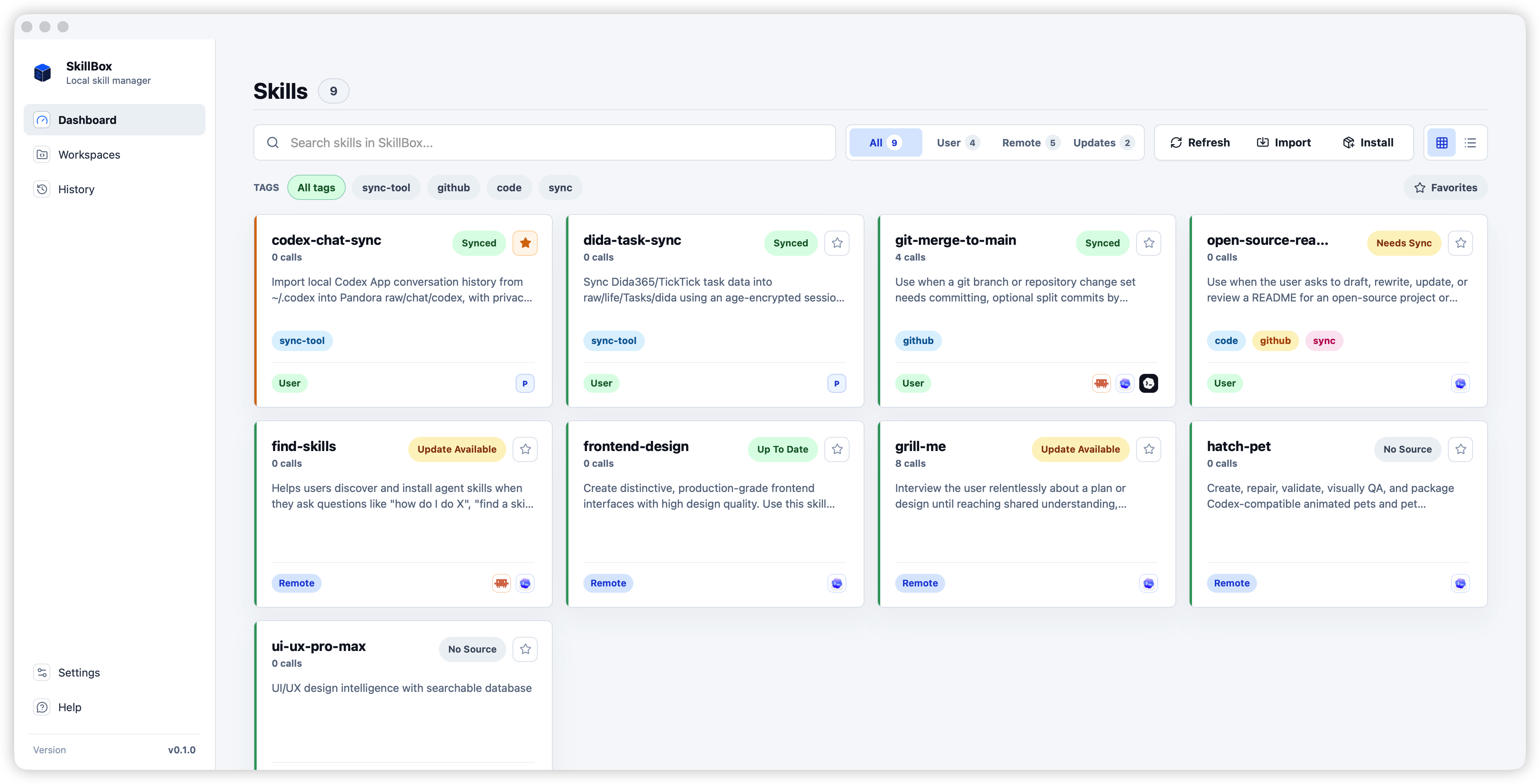
Every skill in one screen
User skills and GitHub-backed remote skills sit in one managed store. Search them, filter by
type or tag, see which are deployed where, and spot available updates without remembering
which agent folder holds which copy.
Deployment
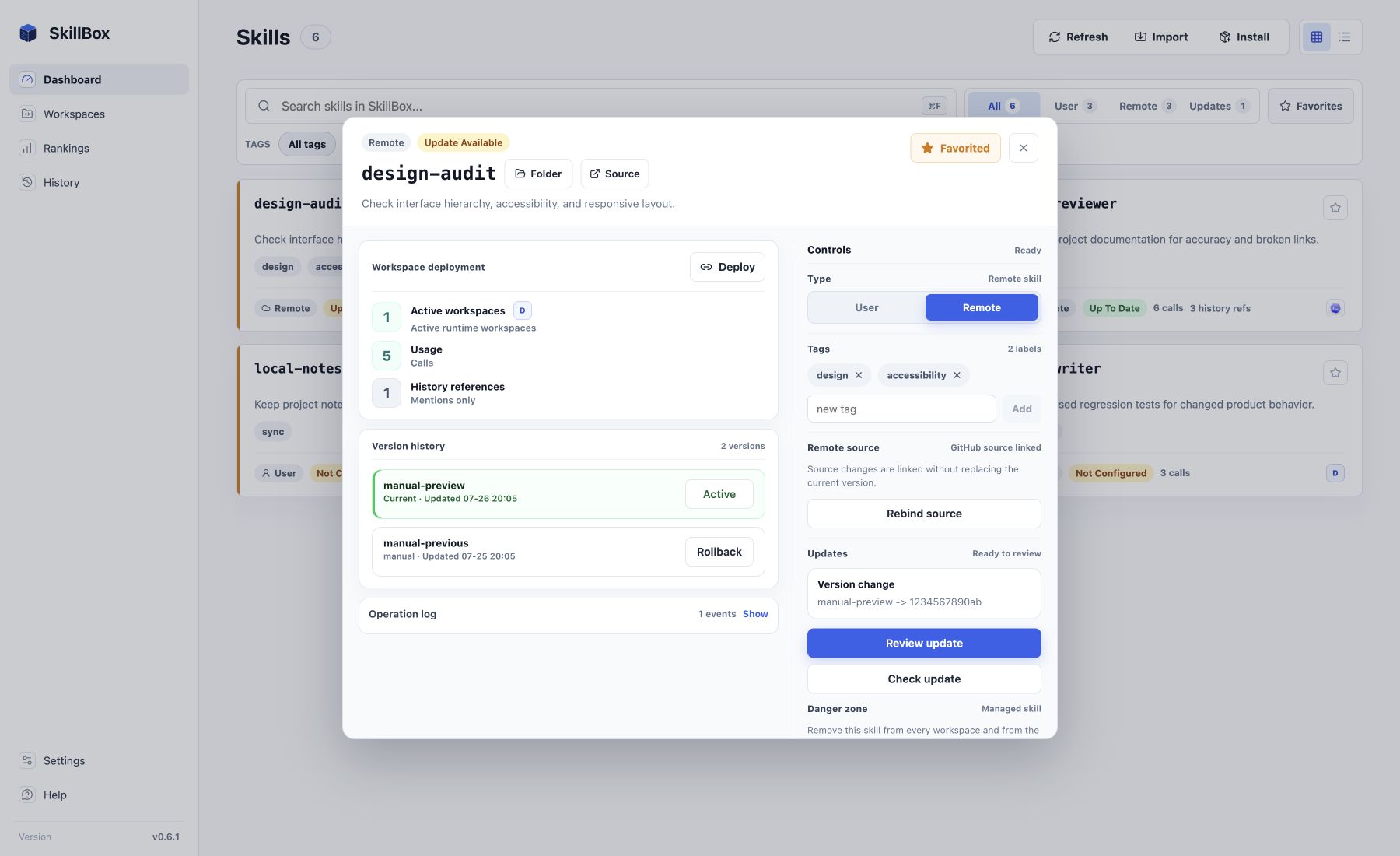
One edit reaches every runtime
A deployed skill is an ownership-checked symlink, so the managed copy stays the real one.
Open a skill to see every workspace it reaches, its version history, and its type, then change
any of it from that single screen instead of editing four folders by hand.
Workspaces
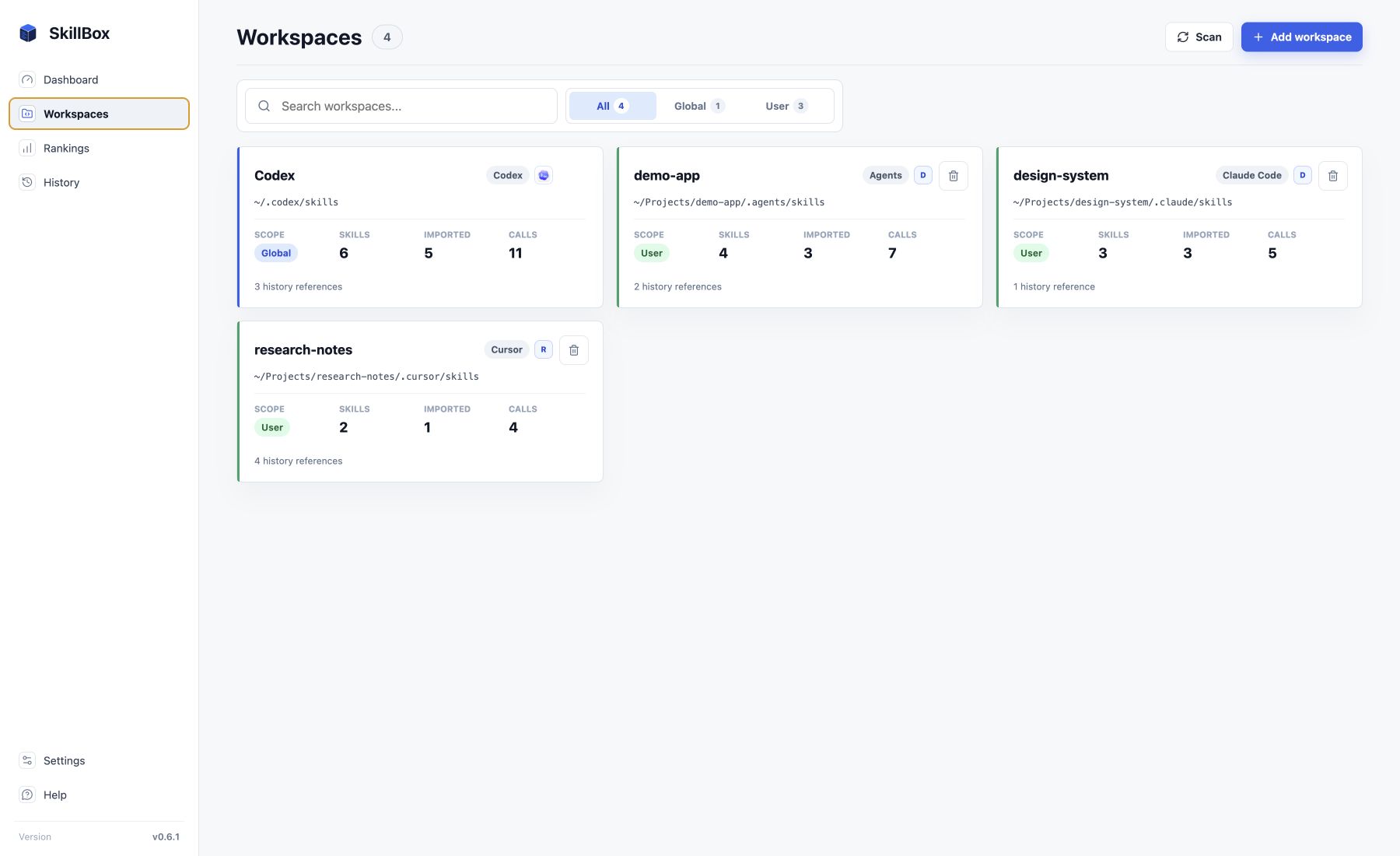
Know where every skill can run
Workspaces identify Agents, Codex, Claude Code, Cursor, and exact custom roots, global or
project-local. Each one reports its own skill count and usage, and
~/.skillbox stays the source of truth behind all of them.
Review before write
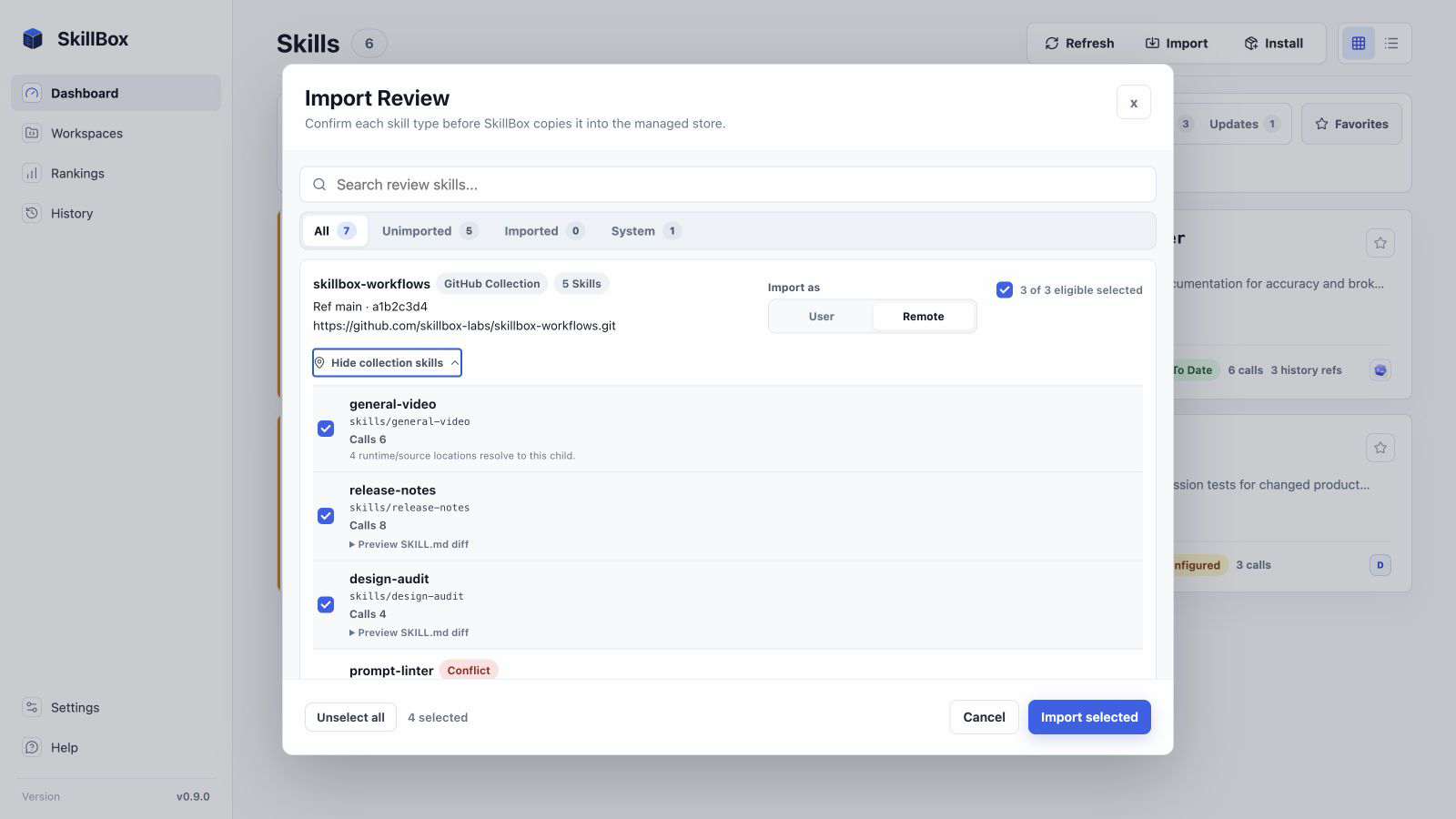
Read the change before it lands
Installing from GitHub fetches one bounded repository ref and reviews it as a single snapshot.
You see the resolved SHA, each child's status, and runtime compatibility before anything is
written. The collection header applies one explicit User/Remote choice to the actionable
children, then selects or clears the eligible set in one move. Mixed or
unresolved type state stays blocked, every child remains independently managed, nothing deploys
automatically, and collection-level
update and rollback remain Phase D work.
Phase C first shipped in v0.9.0; the shared header controls shown here build on that reviewed per-child boundary. Validated copied skills may also group by normalized GitHub source as display-only provenance, without inventing branch, HEAD, or update authority.
Usage
Counted, not guessed
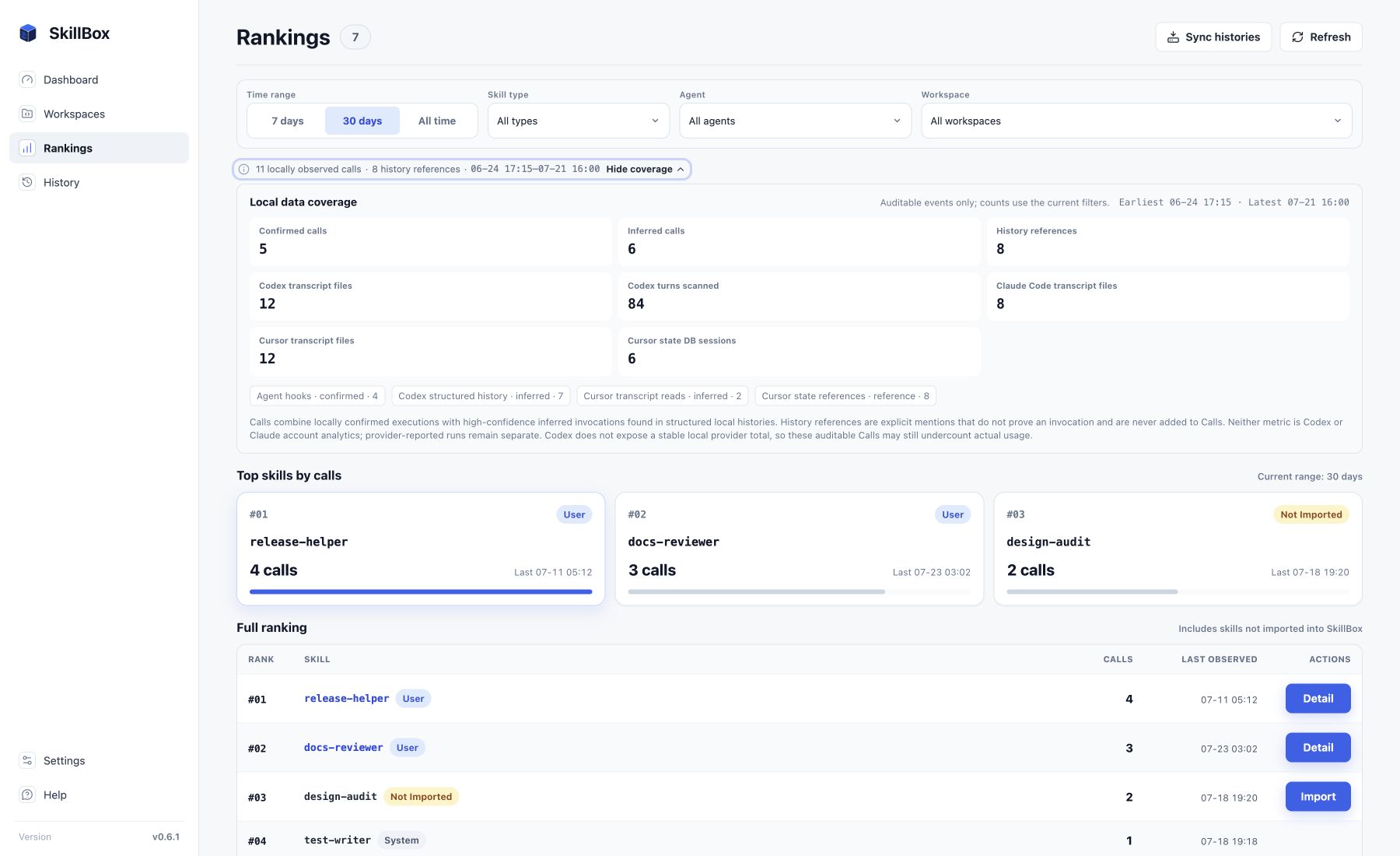
Calls combine locally confirmed and defensible inferred invocations, and a year of daily
activity is one heat map. History references stay separate because a mention is not a run, and
the coverage panel shows exactly which local sources produced each number.
Audit trail
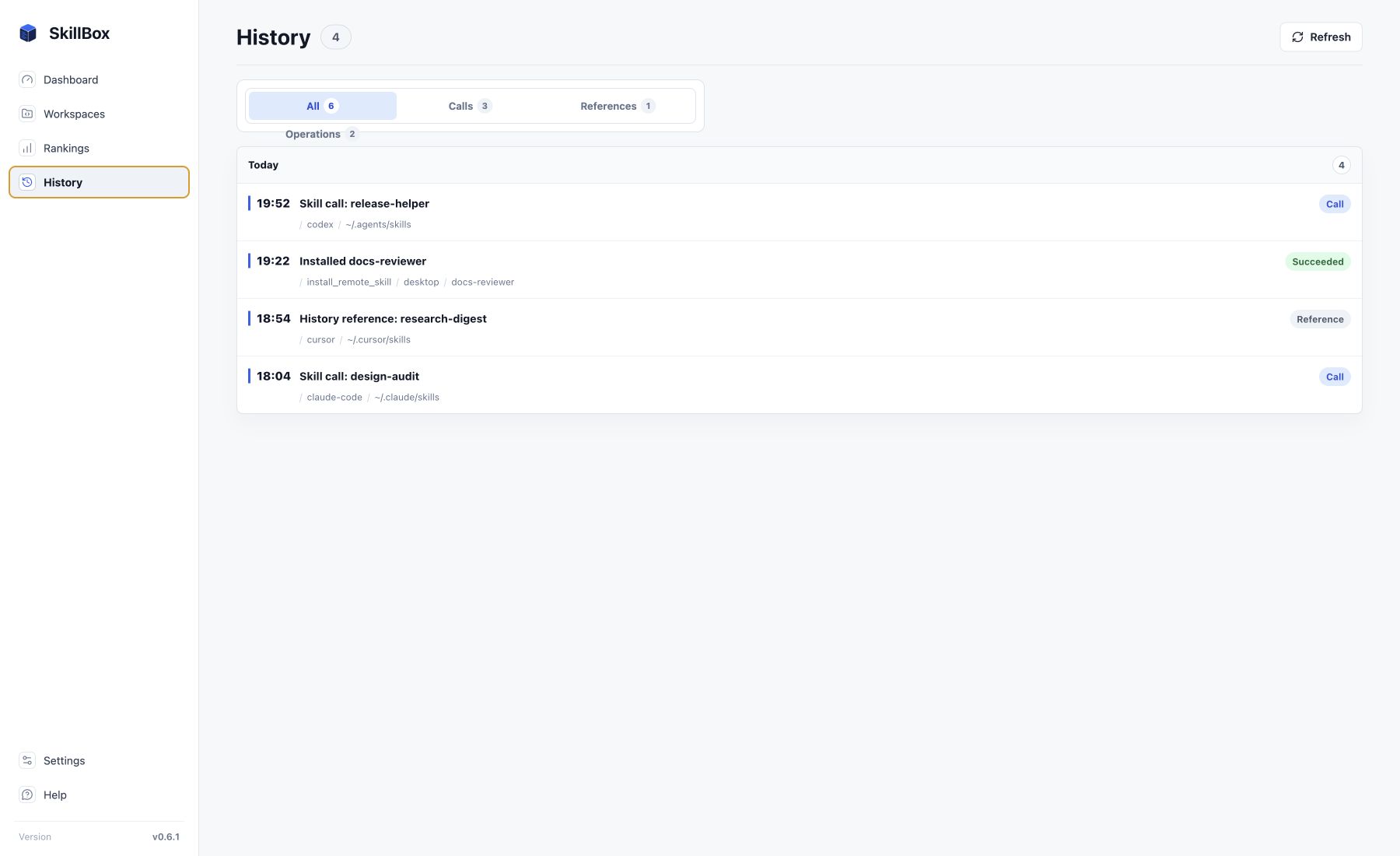
Calls, references, and operations stay inspectable
Sync local Codex, Claude Code, and Cursor histories to recover usage evidence without copying
chat bodies. The History view keeps each evidence class and every management operation
separate and readable, without claiming account analytics.
Trust boundaries
Built for local-first skill management.
Runtime folders, GitHub URLs, downloaded archives, and existing skills are treated as untrusted input.
Local source of truth~/.skillbox holds managed copies, versions, metadata, and backups.
Signed macOS releasesGitHub Releases publish signed and notarized DMGs with updater artifacts.
Version historyGitHub sources stay linked to immutable skill versions for preview and rollback.
No silent overwriteExisting runtime content is reviewed instead of being replaced behind your back.
One reviewed SHAGitHub collection children share the reviewed snapshot; collection update and rollback are not automatic.
Your data stays putSkills, history, and settings live on your Mac. App updates install only after you confirm.
FAQ
Questions people search before installing.
Short answers for developers evaluating SkillBox as their local-first skill manager.
What is SkillBox?
SkillBox is a local-first macOS app and CLI for organizing AI agent skills from one managed library.
It focuses on Codex skills, Claude skills, and other SKILL.md-based workflows that need safer import,
update, and deployment controls.
Where does SkillBox store skills?
Managed user skills and GitHub-backed remote skills live under ~/.skillbox. Runtime
folders become deployment targets rather than the only place a skill exists, so removing an agent
never takes your library with it.
Which agent runtimes does SkillBox target?
SkillBox targets local SKILL.md runtime folders such as .codex/skills,
.agents/skills, .claude/skills, and project-local skill roots. Workspace
targets are explicit, so one library can deploy to the runtimes you actually use.
How are GitHub-backed skill updates reviewed?
GitHub-backed remote skills stay linked to their source and version history. SkillBox previews remote
diffs before applying changes, so imports and updates can be reviewed before they touch runtime folders,
and any version can be rolled back to.
How does a GitHub skill collection work?
A repository or tree ref is fetched once and reviewed as one snapshot. One collection-header
User/Remote decision resolves actionable children, and Select all changes only the eligible set;
unresolved, invalid, imported, system, or conflicted children stay unchanged. Each selected child
remains an independent managed skill, and collection-level update and rollback are not included yet.
Is SkillBox available beyond macOS?
macOS is the current release target. SkillBox is open source, but the packaged desktop app and signed
releases are currently focused on macOS.
Install
Get the current macOS release.
SkillBox currently targets macOS. Download the latest signed DMG or install the cask from the project tap.